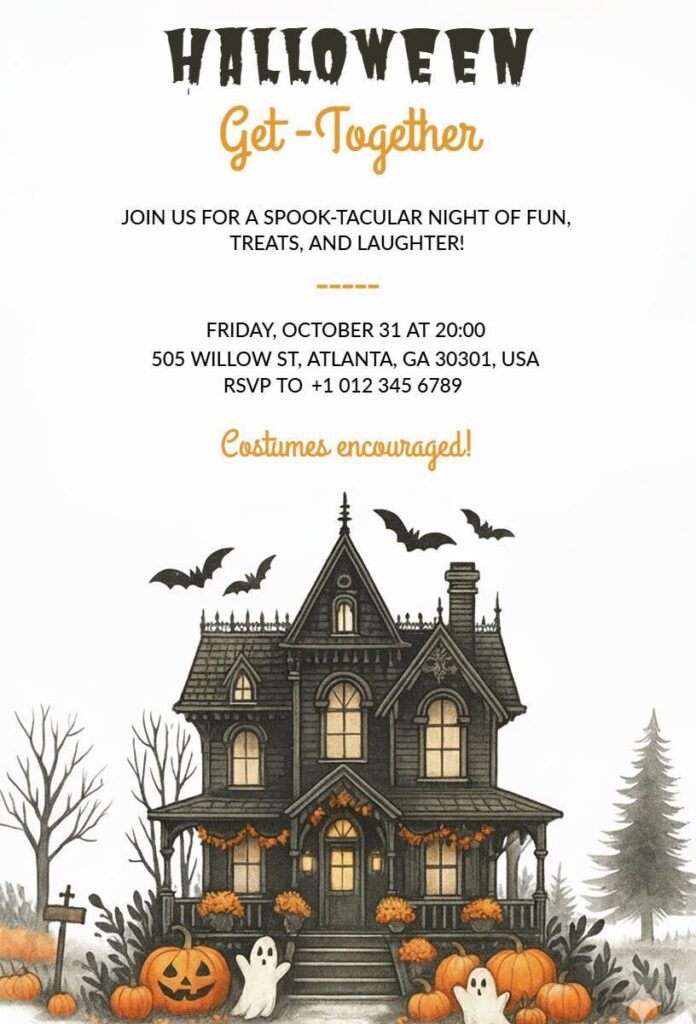
Make inviting your friends easy! Download this Halloween Get-Together Invitation template now. It has a cool haunted house picture and a spooky design that sets the party mood fast. You can quickly change the party details using our custom Halloween invitation maker. Then print it out or send it as a picture right away!
Frequently Asked Questions
The Halloween Get-Together Invitation Template is valuable and easy to use because it offers a pre-designed, spooky layout with haunted houses, pumpkins, and ghosts, saving you time and effort.
Its user-friendly design allows quick customization of details like date, time, and RSVP info using a free online editor. Available in printable PDF and digital formats, it ensures flexibility for sharing or printing. The template’s intuitive structure enhances engagement, making it simple for anyone to create a festive invite. Its professional yet fun aesthetic adds a unique touch, ensuring your party stands out effortlessly.
Creating a Halloween get-together invitation from scratch is simple with the invitation maker. First, open the tool and choose a Halloween Get-Together Invitation Template. Pick a fun or spooky background with pumpkins, ghosts, or a haunted house. Add your party details like the date, time, location, and RSVP information.
Use easy-to-read fonts and Halloween colors such as orange, black, or purple. You can also add fun elements like bats or candles to match your party theme. Once everything looks good, preview your design and download it as a PDF or image to print or share online instantly.
You can easily adapt a general template to suit a specific party theme by focusing on customization. Start by adjusting the primary font color to match your vibe—use deep purple or blood red for a spooky theme, or bright orange and black for a fun, kid-friendly bash. Next, choose specific wording and phrases that hint at your event, such as mentioning “cocktails and costumes” for an adult event or “treats and games” for a family gathering. If the template allows, swap out minor design elements, perhaps changing a smiling jack-o’-lantern to a skull illustration. Explore more spooky Halloween invitation templates for inspiration.
To significantly enhance both the look and functionality, focus on clarity and visual hierarchy. Improve the look by ensuring high-contrast text—for instance, white text on a dark, spooky background—and by maintaining proper spacing around the main details.
For better functionality, you should make sure all essential information is immediately visible, and consider adding a QR code that links directly to an online map for easy navigation.
You can explore different Halloween invitation template ideas for inspiration on how professionals structure their designs to maximize both aesthetic appeal and usability.
You should refresh your template yearly for optimal results, especially if you host the event annually. While the core design can remain consistent, a yearly update allows you to incorporate current Halloween trends, font styles, or popular costume themes that guests will instantly recognize.
For instance, if a specific movie or aesthetic is popular that year, updating your template helps generate more excitement and better attendance. Even small changes, like updating the year and ensuring your RSVP details are current, boost efficiency and prevent confusion among repeat guests.
The RSVP section of your Halloween get-together invitation should include three important details: the RSVP deadline, your preferred contact method, and a guest count request. Set a firm deadline, ideally one week before the party, so you have time to organize food, drinks, and seating.
Make the contact method clear, like “Text Jane at 555-0123” or “Reply to this email.” If your event involves costumes, using Halloween costume party invitation templates helps you include RSVP options for costume participation and any dietary restrictions, making planning easier and guests better prepared.
Start by deciding on the tone of your party: is it spooky/scary (adult), elegant (cocktail party), or fun/whimsical (kids/family)? The tone dictates your color scheme. Spooky themes thrive on black, deep crimson, and muted grays, while fun themes work best with bold orange, neon green, and purple. The theme itself should be communicated through the main image and the headline text.
For example, a “Graveyard Gathering” uses darker colors, while a “Monster Mash” might use brighter colors and cartoony images.
Yes, this Halloween Get-Together Invitation Template works perfectly for both digital sharing and printed invites. You can easily download it as a JPEG or PNG to send via text, email, or social media, ensuring guests receive it instantly. For a polished, professional look, choose the high-resolution PDF version for printing on quality paper.
This flexibility lets you cater to everyone’s preference, whether digital or physical. To make the process simple and fast, you can start customizing your invitation right away using the invitation maker, which allows easy edits to text, colors, and spooky designs.
The biggest mistake is assuming the design is error-free without proofreading. Always double-check the date, time, and address at least three times before finalizing, as typos can confuse guests. Another common error is omitting key details, like whether it’s adults-only or kid-friendly, which affects planning.
Overloading with text or using low-contrast colors can also ruin readability. Stick to bold fonts and spooky hues like orange and black. Test a print or digital preview to catch issues, ensuring your haunted house and pumpkin-themed invite shine for your October 31st party.
The wording on your Halloween Get-Together Invitation sets the entire mood for your event. For a spooky adult party, use phrases like “Join us for a frightfully fun evening,” “Spirits will be served,” or “Enter if you dare.” For family-friendly gatherings, try “You’re invited to a spook-tacular celebration,” “Come for treats and good eats,” or “Join us for Halloween fun and games.” Keep your tone consistent throughout formal events, might say “You are cordially invited to a Halloween soirée,” while casual parties can use “Let’s get spooky together!”
Always match your wording style to your party theme, whether it’s elegant, scary, whimsical, or kid-friendly, ensuring guests immediately understand the event’s vibe.