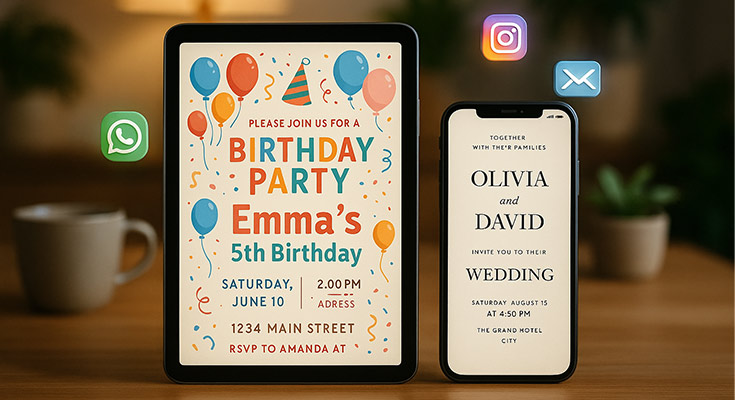
A digital invitation maker is an online platform that allows you to create, customize, and distribute electronic invitations for any event. These tools eliminate the need for traditional paper invites by offering templates, design features, and instant delivery options that save time, money, and resources while providing better tracking capabilities.
Modern event planning has evolved beyond traditional paper invitations. Whether you’re organizing a wedding, birthday party, corporate event, or casual gathering, a digital invitation maker provides the perfect solution for creating professional-looking e-invites that impress your guests and streamline your planning process. With access to hundreds of customizable invitation templates, you can create stunning invitations in minutes rather than weeks.
What Is a Digital Invitation Maker and How Does It Work?
A digital invitation maker is a web-based or mobile application designed to create electronic invitations without requiring graphic design skills. These platforms provide pre-designed templates, customization tools, and distribution features that make event planning more efficient.
The process typically involves four simple steps. First, you select a template that matches your event type and style preferences. Next, you customize the design by adding your event details, personalizing colors, fonts, and images. Then, you preview your invitation across different devices to ensure optimal display. Finally, you distribute the invitation through various channels like email, social media, or messaging apps.
Digital invitation makers work by combining user-friendly design interfaces with cloud-based storage and distribution systems. When you create an invitation, it’s stored on secure servers and can be accessed via unique links that you share with guests. This approach ensures your invitations remain accessible and trackable throughout your event planning process.
Why Choose Digital Invitations Over Traditional Paper Invites?
Digital invitation makers offer significant advantages over traditional paper invitations, making them the preferred choice for modern event planners. For a comprehensive analysis of both approaches, read our detailed e-invites vs printed invites comparison guide. Understanding these benefits helps you make informed decisions about your invitation strategy.
Cost Efficiency and Budget Benefits
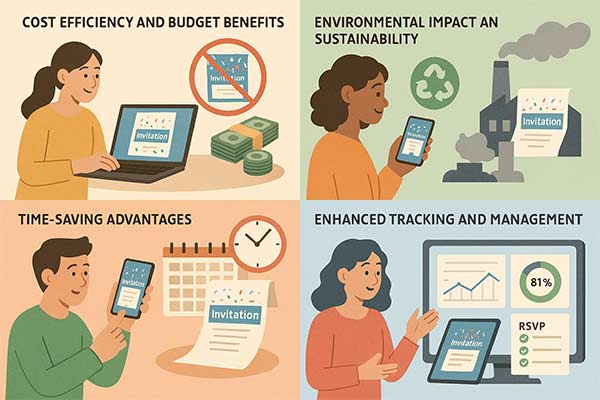
Traditional paper invitations can cost between $2-8 per invitation when including printing, postage, and materials.1 Digital invitations eliminate these expenses entirely, allowing you to allocate your budget toward other event priorities like catering or entertainment.
Most digital invitation makers offer free basic plans with premium features available at affordable monthly rates. This pricing structure means you can create unlimited invitations for multiple events without ongoing per-invitation costs.
Environmental Impact and Sustainability
Choosing digital invitations significantly reduces your environmental footprint. Paper invitations require tree harvesting, chemical processing, printing resources, and transportation for delivery. Digital alternatives eliminate these environmental impacts while supporting sustainable event planning practices.
Time-Saving Advantages
Digital invitation creation and distribution happen in minutes rather than weeks. Traditional invitations require design approval, printing time, addressing, and postal delivery, which can take 2-3 weeks. Digital invitations reach recipients instantly, allowing for last-minute event announcements or quick plan changes.
Enhanced Tracking and Management
Digital invitation makers provide real-time analytics that paper invitations cannot match. You can track delivery confirmation, open rates, click-through rates, and RSVP responses instantly. This data helps you follow up with non-respondents and make informed decisions about catering numbers and venue arrangements.
Essential Features to Look for in a Digital Invitation Maker
Selecting the right digital invitation maker requires understanding which features matter most for your event planning needs. These key capabilities ensure your chosen platform delivers professional results and streamlines your workflow.
Template Library and Design Options
A robust digital invitation maker should offer diverse template categories covering weddings, birthdays, corporate events, baby showers, graduations, and seasonal celebrations. Look for platforms providing at least 200+ templates with regular updates and trending designs.
Quality templates feature professional typography, balanced layouts, and high-resolution graphics. The best platforms organize templates by occasion, style, and color scheme, making it easy to find options that match your event vision.
Customization Tools and Flexibility
Advanced customization capabilities distinguish professional-grade digital invitation makers from basic alternatives. To master these design elements, explore our comprehensive invitation card design tips guide for professional techniques. Essential customization features include font selection with 50+ options, unlimited color palette access, image upload and editing tools, text formatting controls, and layout modification options.
The platform should support personal branding elements like logos, custom graphics, and brand colors. This flexibility ensures your invitations align with existing brand guidelines for corporate events or personal style preferences.
Guest Management and RSVP Tracking
Comprehensive guest management features streamline invitation distribution and response tracking. Look for platforms offering contact list imports, guest categorization options, automated reminder systems, RSVP deadline management, and response analytics.
Advanced platforms provide custom RSVP forms allowing you to collect additional information like dietary restrictions, plus-one details, or song requests. This data collection capability enhances event planning accuracy and guest experience.
Multi-Platform Distribution Options
Modern digital invitation makers support multiple distribution channels to reach guests through their preferred communication methods. Essential distribution features include direct email sending, social media sharing, WhatsApp integration, SMS capabilities, and downloadable PDF/image formats.
The platform should generate shareable links that display properly across all devices and email clients. This compatibility ensures a consistent invitation presentation regardless of how guests access your invitation.
Digital Invitation Maker Design Ideas and Examples
Creating visually appealing digital invitations requires understanding current design trends and applying them effectively to your specific event type. These design approaches help your invitations stand out while maintaining a professional appearance.
Wedding Digital Invitation Design Trends
Modern wedding digital invitations embrace elegant minimalism with sophisticated typography and romantic color palettes. Popular design elements include watercolor backgrounds, gold foil effects, floral borders, and script fonts that convey intimacy and celebration.

Contemporary couples often choose designs featuring engagement photos, custom illustrations of their venue, or meaningful symbols representing their relationship. Animation elements like subtle sparkles or gentle fading effects add luxury touches without overwhelming the core message. Explore simple wedding invitation templates for minimalist approaches or discover floral wedding invitation designs for romantic celebrations.
Birthday Party Invitation Inspiration
Birthday digital invitations vary dramatically based on age group and celebration style. Children’s birthday invitations feature bright colors, cartoon characters, and playful fonts that create excitement and anticipation. Popular themes include superhero birthday invitations, unicorn party designs, and dinosaur-themed celebrations.
Adult birthday celebrations call for more sophisticated approaches using elegant color schemes, modern typography, and lifestyle imagery. Milestone birthdays (30th, 40th, 50th) often incorporate timeline elements, photo collages, or metallic accents that highlight the significance of the occasion. Consider 30th birthday invitation templates for contemporary designs or 50th birthday invitation ideas for elegant celebrations.

Corporate Event Digital Invitation Examples
Professional digital invitations balance brand representation with event information clarity. Successful corporate invitations incorporate company colors and logos while maintaining clean, readable layouts that reflect organizational professionalism.
Industry-specific design elements enhance relevance and engagement. Technology companies might use geometric patterns and bold typography, while healthcare organizations prefer calming colors and trust-building imagery.

Seasonal and Holiday Invitation Designs
Seasonal digital invitations leverage holiday themes and cultural symbols to create immediate recognition and emotional connection. Christmas invitation templates often feature traditional red and green color schemes with winter imagery, while Halloween invitation designs embrace spooky themes with creative backgrounds. Summer party invitations embrace bright, energetic designs with tropical elements, and 4th of July invitation templates celebrate patriotic themes with red, white, and blue color schemes.
The key to successful seasonal design lies in balancing thematic elements with readability and information hierarchy. Decorative elements should enhance rather than obscure essential event details.

How to Create Professional Digital Invitations: Step-by-Step Guide
Creating professional-quality digital invitations follows a systematic approach that ensures optimal results regardless of your design experience level. This comprehensive process guides you from initial planning through final distribution.
Step 1: Define Your Event Requirements
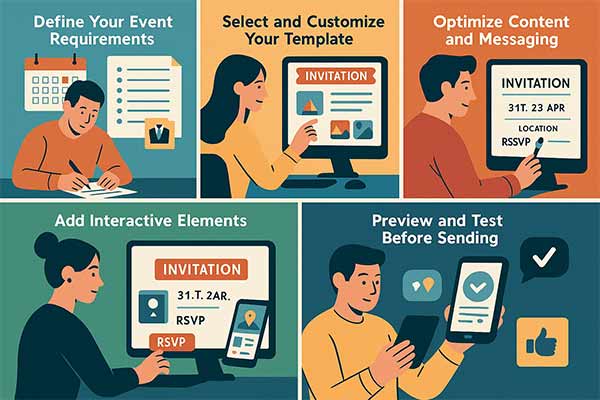
Begin by documenting essential event information, including date, time, location, dress code, RSVP deadline, and special instructions. Having complete details before starting design prevents multiple revisions and ensures accuracy.
Consider your target audience and their preferences. Formal events require conservative design approaches, while casual gatherings allow for creative experimentation. Your guest demographic also influences distribution method selection and mobile optimization priorities.
Step 2: Select and Customize Your Template
Choose a template that aligns with your event type and personal style preferences. Most digital invitation makers categorize templates by occasion, making selection straightforward. Pay attention to layout orientation (portrait vs. landscape) and information hierarchy when making your choice.
Customize your selected template by adding event details, adjusting colors to match your theme, uploading personal images or logos, modifying text fonts and sizes, and removing or adding design elements as needed.
Step 3: Optimize Content and Messaging
Craft compelling invitation copy that provides essential information while creating excitement about your event. For specific wording inspiration, explore our collection of invitation wording ideas for every occasion. Use action-oriented language and clear formatting to guide the reader’s attention to crucial details.
Essential content elements include event title and purpose, complete date and time information, detailed location with address, RSVP instructions and deadline, dress code or special requirements, and contact information for questions.
Step 4: Add Interactive Elements
Enhance your digital invitation with interactive features that improve guest experience and streamline event management. Popular interactive elements include clickable RSVP buttons, “Add to Calendar” links, Google Maps integration, photo galleries, and social media sharing options.
Test all interactive elements across different devices and browsers to ensure consistent functionality. Broken links or non-responsive buttons create negative first impressions and may result in missed RSVPs.
Step 5: Preview and Test Before Sending
Comprehensive testing prevents embarrassing mistakes and ensures professional presentation. Review your invitation on multiple devices, including smartphones, tablets, and desktop computers. Check text readability, image quality, and interactive element functionality.
Send test invitations to trusted friends or family members for feedback on clarity, visual appeal, and technical performance. External perspectives often identify issues you might overlook during the creation process.
Digital Invitation Distribution and Delivery Methods
Successful digital invitation distribution requires strategic planning and understanding of various delivery channels. Master the complete process with our detailed guide on how to send invitations digitally for best practices and troubleshooting tips. Each method offers unique advantages and reaches different audience segments effectively.
Email Distribution Best Practices
Email remains the most popular digital invitation delivery method due to its universal accessibility and professional appearance.2 Successful email distribution requires attention to subject line optimization, sender reputation management, and timing considerations.
Craft compelling subject lines that clearly identify the event and create urgency or excitement. Avoid spam trigger words and excessive punctuation that might cause delivery issues. Examples of effective subject lines include “You’re Invited: [Event Name] on [Date]” or “[Host Name] Requests Your Presence at [Event Type].”
Social Media and Messaging App Integration
Modern digital invitation makers integrate with popular social platforms and messaging applications to reach guests through their preferred communication channels. WhatsApp integration is particularly valuable for casual events and younger demographics who primarily communicate through messaging apps.
Facebook event integration allows you to create companion events that provide ongoing communication channels for updates, discussions, and photo sharing. This approach works well for large gatherings where community building enhances the overall experience.
QR Code and Link Sharing Options
QR codes provide convenient sharing methods for in-person invitation distribution. Guests can scan codes with smartphone cameras to instantly access digital invitations, making this approach perfect for workplace announcements or community event promotion.
Shareable links offer flexibility for various distribution scenarios. You can include links in text messages, embed them in websites, or share them during video calls. Ensure links are shortened and memorable for easy verbal communication.
Delivery Timing and Scheduling
Optimal delivery timing varies by event type and cultural considerations. For comprehensive guidance on proper invitation protocols, consult our modern invitation etiquette guide covering timing, wording, and social conventions. Wedding invitations should be sent 6-8 weeks in advance, birthday party invitations work best 2-3 weeks prior, and corporate events require 4-6 weeks for professional planning.
Many digital invitation makers offer scheduling features that automatically send invitations at optimal times. This automation ensures consistent delivery timing and removes the burden of manual sending coordination.
RSVP Management and Guest Tracking Features
Effective RSVP management transforms chaotic event planning into organized, data-driven processes. Digital invitation makers provide sophisticated tracking tools that eliminate guesswork and enable informed decision-making.
Real-Time RSVP Tracking and Analytics
Modern digital invitation platforms offer comprehensive dashboards displaying response rates, guest attendance projections, and engagement metrics. These analytics help you monitor invitation performance and identify potential issues early in the planning process.
Real-time tracking allows you to follow up with non-respondents strategically. You can identify which guests opened invitations but haven’t responded, enabling targeted reminder campaigns that improve overall response rates. Learn more about how to use RSVP in invitations and discover the best ways to remind guests to RSVP for optimal response rates.
Custom RSVP Forms and Data Collection
Advanced RSVP systems allow custom form creation that collects specific information relevant to your event planning needs. Common custom fields include dietary restrictions, guest count for plus-ones, transportation needs, accommodation requirements, and special requests.
This data collection capability streamlines catering planning, venue setup, and logistics coordination. Having detailed guest information before your event reduces last-minute complications and enhances the overall guest experience. Explore our comprehensive guide on managing RSVP responses for successful events for expert tips.
Automated Reminder Systems
Digital invitation makers often include automated reminder features that send follow-up messages to guests who haven’t responded by specified deadlines. These systems can send multiple reminders at strategic intervals without requiring manual intervention.
Effective reminder campaigns use graduated messaging that increases urgency over time. Initial reminders maintain friendly tones, while final notices emphasize RSVP importance for accurate planning. Automated systems ensure consistent communication without overwhelming your personal schedule.
Mobile Optimization and Cross-Device Compatibility
Mobile devices account for over 60% of digital invitation views, making mobile optimization crucial for successful event communication. Understanding mobile design principles ensures your invitations look professional and function properly across all devices.
Responsive Design Principles
Effective digital invitations adapt seamlessly to different screen sizes while maintaining visual hierarchy and readability. Key responsive design elements include scalable text that remains legible on small screens, touch-friendly button sizes, optimized image dimensions, and simplified navigation that works with finger taps.
Loading speed optimization becomes critical for mobile users who may have limited bandwidth or data plans. Digital invitation makers should compress images automatically and minimize code bloat that slows page loading times.
Touch Interface Considerations
Mobile invitation design requires consideration of touch interface limitations and advantages. Interactive elements must be sized appropriately for finger taps, with minimum 44-pixel touch targets recommended for optimal usability.
Swipe gestures can enhance mobile invitation experiences when implemented thoughtfully. Photo galleries, multiple invitation pages, or information sections can use swipe navigation that feels natural on mobile devices.
Cross-Platform Testing and Compatibility
Comprehensive testing across different devices, operating systems, and browsers ensures consistent invitation presentation for all guests. Popular testing scenarios include iOS Safari, Android Chrome, desktop browsers, and various screen resolutions.
Email client compatibility adds another layer of complexity for email-distributed invitations. Different email applications render HTML and CSS differently, requiring careful design choices that work universally.
Common Digital Invitation Mistakes to Avoid
Understanding frequent digital invitation pitfalls helps you create more effective communications and avoid embarrassing errors that can impact your event’s success. These common mistakes often result from rushing the creation process or overlooking technical considerations.
Information Accuracy and Completeness
The most critical mistake involves providing incorrect or incomplete event information. Common errors include wrong dates or times, incorrect venue addresses, missing RSVP deadlines, unclear dress codes, and omitted contact information for questions.
Always double-check all event details against original planning documents before finalizing your invitation. Have multiple people review the invitation for accuracy, especially for important events like weddings or corporate functions.
Design and Readability Issues
Poor design choices can make beautiful invitations ineffective at communicating essential information. Frequent design mistakes include choosing fonts that are difficult to read on mobile devices, using color combinations with insufficient contrast, overcrowding layouts with too much information, and selecting images that don’t reproduce well at small sizes.
Maintain a visual hierarchy that guides readers to the most important information first. Event title, date, and location should be immediately apparent, with secondary details like dress code and RSVP instructions clearly separated but easily accessible.
Technical and Distribution Problems
Technical issues can prevent guests from accessing or responding to your invitations. Common technical mistakes include using platforms that don’t work on all devices, creating download links that expire, forgetting to test RSVP functionality, and not providing alternative contact methods for guests experiencing technical difficulties.
Distribution timing mistakes can also impact invitation effectiveness. Sending invitations too early may result in forgotten events, while late distribution doesn’t provide adequate planning time for guests. Industry best practices recommend specific timing windows for different event types.
Advanced Tips for Digital Invitation Success
Take your event outreach to the next level with these expert strategies. These digital invitation tips help boost engagement, streamline planning, and leave a lasting impression.
Personalization Strategies That Increase Engagement
Personalized digital invitations achieve significantly higher response rates than generic alternatives.3 Effective personalization goes beyond adding guest names to include relevant details like relationship references, shared memories, or customized messaging based on guest categories.
Advanced platforms allow variable content insertion that automatically customizes invitations based on guest data. For example, family members might see casual language while professional contacts receive formal wording, all from the same base template.
Integration with Event Planning Tools
Modern digital invitation makers integrate with popular event planning platforms and calendar applications. These integrations streamline workflow by automatically syncing RSVP data with catering systems, seating chart tools, and vendor coordination platforms.
Connect your invitation platform with Google Calendar, Outlook, or specialized event planning software to create seamless planning workflows. Guest responses can automatically update capacity planning tools and trigger follow-up communications.
Building Anticipation Through Multi-Touch Campaigns
Sophisticated event promotion uses multiple touchpoints that build excitement over time. Start with save-the-date announcements, follow with detailed invitations, send reminder messages, and conclude with final logistics communications.
Each communication should provide incremental value while maintaining consistent branding and messaging. This approach keeps your event top-of-mind and demonstrates professional organization that guests appreciate.
FAQs About Digital Invitation Makers
Several platforms offer excellent free digital invitation maker options with different strengths. Canva provides extensive template libraries and design flexibility, while Evite specializes in party planning features and RSVP management.
Most digital invitation makers allow high-resolution downloads suitable for printing. This hybrid approach works well when you want digital conveniences like RSVP tracking while providing physical invitations for guests who prefer traditional formats.
Optimal timing varies by event type. Wedding invitations should be sent 6-8 weeks in advance, birthday parties work best with 2-3 weeks’ notice, corporate events need 4-6 weeks for professional planning, and casual gatherings can be announced 1-2 weeks prior. For specific guidance, check our RSVP guide for birthday invitations and explore modern invitation etiquette guidelines.
Essential information includes event title and purpose, complete date and time details, specific venue location with address, clear RSVP instructions and deadline, dress code or special requirements, contact information for questions, and any relevant links like maps or registries. Learn more about invitation wording ideas for different occasions.
Most digital invitation platforms provide analytics dashboards showing delivery confirmation, open rates, click-through rates, and RSVP responses. These metrics help you identify guests who need follow-up communication and measure invitation effectiveness. For detailed guidance, explore our article on tracking RSVP responses online easily.
Conclusion: Mastering Digital Invitation Creation
Digital invitation makers have revolutionized event planning by providing professional-quality design tools, sophisticated distribution options, and comprehensive guest management features that surpass traditional paper alternatives. Success with these platforms requires understanding your audience, choosing appropriate templates, optimizing for mobile devices, and leveraging advanced features like RSVP tracking and automated reminders.
The key to creating memorable digital invitations lies in balancing visual appeal with functional effectiveness. Focus on clear information hierarchy, mobile-friendly design, and interactive elements that enhance rather than complicate the guest experience. Remember that your invitation creates the first impression of your event, so invest time in thoughtful design and thorough testing.
As digital communication continues evolving, staying current with design trends and platform capabilities ensures your invitations remain effective and engaging. Whether you’re planning intimate gatherings or large-scale celebrations, mastering digital invitation creation will streamline your planning process and create positive experiences for both you and your guests.
Ready to create your first professional digital invitation? For additional comprehensive strategies and advanced techniques, explore our complete guide to creating digital invitations for events. Start by selecting a reputable platform that offers the features most important for your event type, then follow the systematic approach outlined in this guide to achieve outstanding results that impress your guests and simplify your planning process.
Reference
- Marketing Budget Optimization – U.S. Small Business Administration(Rieva Lesonsky).
- Search and Email Popularity Study – Pew Research Center(Kristen Purcell).
- Marketing Revenue Research – U.S. Small Business Administration(Rieva Lesonsky).