
Planning your next celebration but overwhelmed by invitation options? You’re not alone. With multiple digital channels available, understanding how to send invitations digitally can feel complicated. This comprehensive guide will walk you through every digital invitation method, helping you reach your guests effectively while saving time and money.
Whether you’re looking for a reliable online invitation card maker or want to explore various digital distribution methods, the key is choosing the right approach for your specific event and audience. The most effective digital invitation methods are email for formal events, SMS for urgent invitations, QR codes for tech-savvy audiences, and social media for casual gatherings.
Why Should You Choose Digital Invitations Over Traditional Paper?
Digital invitations have revolutionized event planning, offering unprecedented convenience and cost-effectiveness. Unlike traditional paper invitations that require printing, addressing, and mailing, digital methods deliver instantly and provide real-time tracking capabilities.
The environmental benefits are substantial as well. A single digital invitation prevents approximately 0.05 pounds of paper waste and reduces the carbon footprint by eliminating transportation needs. For larger events, these savings multiply significantly.
How to Send Invitations via SMS (Text Messages)?
Understanding SMS Invitation Basics
Text message invitations offer the highest open rates among digital channels, with studies showing 98% of SMS messages are read within minutes of delivery. This immediacy makes SMS perfect for last-minute events or urgent updates.
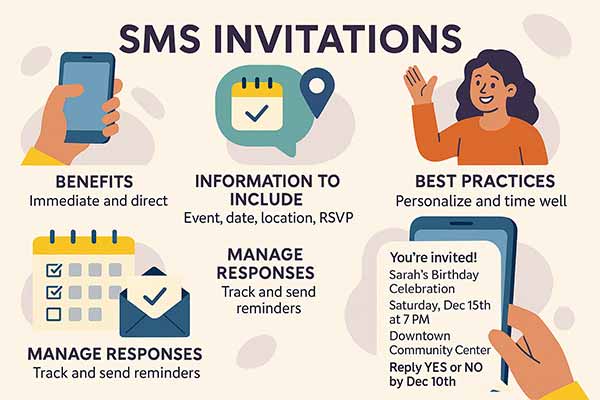
What Information to Include in SMS Invitations
Your SMS invitation should contain essential details without overwhelming recipients. The optimal format includes:
- Event name and type: “Sarah’s Birthday Celebration”
- Date and time: “Saturday, Dec 15th at 7 PM”
- Location: “Downtown Community Center”
- RSVP method: “Reply YES or NO by Dec 10th”
- Contact info: Your phone number for questions
Character limits vary by carrier, but keeping messages under 160 characters ensures universal compatibility. If more details are needed, include a link to a webpage with complete information.
SMS Invitation Best Practices
- Timing matters significantly for SMS invitations. Send initial invites during business hours (9 AM – 5 PM) on weekdays or early weekend afternoons. Avoid sending early morning or late evening sends to respect recipients’ schedules.
- Personalization increases response rates by up to 35%. Include the recipient’s name and reference your relationship: “Hi John, you’re invited to my housewarming party…”
- Group messaging requires careful consideration. While convenient, group SMS can feel impersonal and may overwhelm recipients with reply-all responses. Consider individual messages for smaller gatherings or use a dedicated group messaging app for larger events.
According to California Sea Grant, effective SMS invitations are concise (≤ 160 characters), clearly identify the sender, include opt‑in/opt‑out information per FCC guidelines, and are best sent at thoughtful times to respect recipients’ preferences.1
Managing SMS RSVP Responses
Create a simple response system by requesting “YES” or “NO” replies. Maintain a spreadsheet to track responses and send confirmation messages to those who accept. For complex events requiring meal choices or additional information, direct responders to a simple online form.
- Reminder strategy: Send a gentle reminder 3-5 days before the event to confirmed attendees, including any last-minute details or parking information.
Legal Considerations for Bulk SMS
If sending to more than 10 recipients or using automated services, familiarize yourself with SMS marketing regulations. The Telephone Consumer Protection Act (TCPA) requires consent for marketing messages, though personal event invitations typically fall under different rules.
How to Send Invitations via Email?
Email invitations remain a versatile and visually rich option for both formal and informal events. They allow for detailed customization, tracking, and creative presentation.
Crafting Compelling Email Subject Lines
Your subject line determines whether recipients open your invitation. Effective subject lines are specific, create urgency, and hint at the event’s excitement. Examples of high-performing subject lines include:
- “You’re Invited: Sarah’s Surprise 30th Birthday Party”
- “Join Us for an Unforgettable Evening – Wedding Celebration”
- “Save the Date: Annual Holiday Potluck December 20th”
Avoid generic phrases like “Party Invitation” or “You’re Invited” without context. Recipients receive dozens of emails daily, so specificity helps your invitation stand out.
Designing Attractive Email Invitations
Email design significantly impacts recipient engagement and RSVP rates. Professional-looking invitations convey event importance and encourage attendance.
- Visual hierarchy guides readers through essential information. Use larger fonts for event names, medium sizes for dates and locations, and smaller text for additional details. Maintain consistent spacing and alignment for a polished appearance.
- Color psychology influences recipient emotions. Warm colors (reds, oranges) create excitement for casual parties, while cool tones (blues, greens) suit professional events. Ensure sufficient contrast between text and background colors for readability.
- Mobile optimization is crucial since over 60% of emails are opened on mobile devices. Use single-column layouts, larger buttons, and readable font sizes (minimum 14px for body text).
Before vs After: Email Invitation Design

This image compares a basic, text-only email invitation with a vibrant, well-designed version. The improved design includes visuals, personalized details, and a clear layout that makes the event feel more inviting and professional, ultimately encouraging higher engagement and RSVP rates.
Email Template Structure for Maximum Impact
Successful email invitations follow a proven structure that guides recipients toward RSVP action:
- Header section: Event name with eye-catching graphics.
- Hero image: Visual representation of the event theme.
- Essential details: Date, time, location in scannable format
- Description: Brief, engaging event overview
- RSVP section: Clear call-to-action button
- Additional information: Dress code, parking, contact details
- Footer: Host contact information and social links
First time creating digital invitations? This digital invitation maker guide walks through the design process from start to finish.
Avoiding Spam Filters
Email deliverability affects invitation success rates. Spam filters examine sender reputation, content, and recipient engagement to determine inbox placement.
- Sender authentication improves deliverability. Use your email address rather than generic accounts, and ensure your domain has proper SPF and DKIM records configured.
- Content best practices include avoiding excessive capitalization, multiple exclamation points, and spam trigger words like “FREE” or “URGENT.” Balance images with text, as image-heavy emails often trigger filters.
- List hygiene maintains the sender’s reputation. Remove bounced email addresses promptly and honor unsubscribe requests immediately.
According to the University of Connecticut’s ITS, emails may be incorrectly flagged as spam due to failing SPF validation, containing suspicious hyperlinks, having HTML formatting issues, or violating RFC standards, factors that can be managed to improve deliverability.2
Tracking Email Invitation Performance
Monitor invitation effectiveness through key metrics:
- Open rates indicate subject line performance and sender recognition. Industry averages range from 15-25% for personal events.
- Click-through rates measure recipient engagement with your content and RSVP links. Rates above 3% suggest effective design and compelling content.
- RSVP conversion rates show the percentage of recipients who respond. Optimize underperforming invitations by testing different subject lines, send times, or designs.
How to Send Invitations via QR Codes?
QR codes offer a modern, contactless way to share event details and drive guest engagement. They’re easy to scan, highly versatile, and ideal for both printed and digital invitations.
Understanding QR Code Technology for Invitations
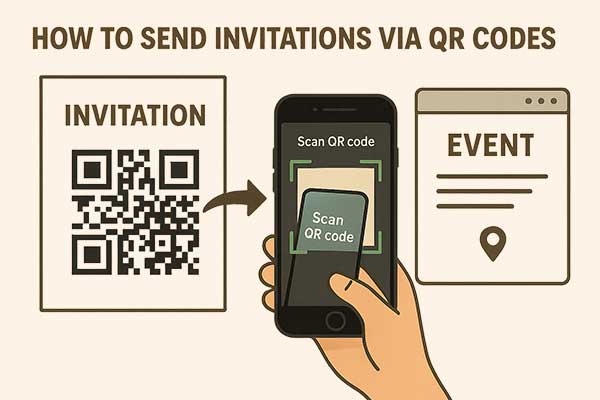
QR codes bridge physical and digital invitation experiences, allowing guests to access detailed event information instantly. When scanned, QR codes can direct recipients to RSVP forms, calendar links, location maps, or comprehensive event websites.
This technology particularly appeals to tech-savvy audiences and provides contactless sharing options that became essential during recent health concerns.
Creating Effective QR Code Invitations
QR code generators vary in features and reliability. Choose platforms offering custom designs, analytics tracking, and permanent links that won’t expire. Avoid free services that may delete codes or display advertisements.
Linking destinations should provide clear value. Popular QR code targets include:
- Event landing pages with complete details
- Online RSVP forms with meal preferences
- Calendar integration for automatic scheduling
- Interactive maps with parking information
- Social media event pages for ongoing updates
Design integration makes QR codes feel intentional rather than afterthoughts. Match QR code colors to invitation themes, add decorative borders, or incorporate logos in the center while maintaining scannability.
QR Code Size and Placement Guidelines
- Minimum size requirements ensure reliable scanning across devices. Print QR codes at least 1 inch (2.5 cm) square for business card-sized invitations, and scale proportionally for larger formats.
- Placement strategy affects scanning success. Position QR codes in lower-right corners where they’re easily accessible but don’t overshadow main content. Ensure the surrounding white space (quiet zone) of at least 4 modules wide.
- Testing protocols prevent event-day disasters. Test QR codes on multiple devices and scanning apps before finalizing invitations. Verify that linked content displays properly on both iOS and Android platforms.
Providing QR Code Alternatives
Not all guests can easily scan QR codes due to older phones, visual impairments, or technical difficulties. Always include alternative access methods:
- Backup URLs should be shortened and displayed near QR codes. Services like bit.ly or tinyurl create memorable links.
- Phone instructions help less tech-savvy guests. Include simple text like “Can’t scan? Visit [website] or call [phone number] for details.”
- Traditional elements maintain invitation completeness. Include essential information (date, time, location) directly on invitations rather than hiding everything behind QR codes.
Still considering physical invites? Here’s what you should know about invitation card makers for physical cards and hybrid approaches.
Tracking QR Code Engagement
QR code analytics provide valuable guest engagement insights. Track metrics including:
- Scan frequency shows invitation reach and guest interest levels.
- Device types help optimize linked content for prevalent platforms.
- Geographic data reveals invitation distribution patterns.
- Time-based scanning indicates when guests typically engage with invitations.
How to Send Invitations via Social Media?

Choosing the Right Social Media Platform
Different platforms serve distinct audiences and event types. Platform selection significantly impacts invitation reach and response rates.
- Facebook excels for community events and mixed-age groups. The robust event creation tools include RSVP tracking, guest messaging, and photo sharing capabilities. Facebook’s algorithm favors event content, increasing organic reach among friends.
- Instagram appeals to younger demographics and visual events. This makes it perfect for celebrations like birthday parties, where creative birthday invitation designs can showcase the party theme and generate excitement through visual storytelling.
- WhatsApp provides intimate group communication ideal for close friends and family events. Group creation allows ongoing event coordination and real-time updates.
- LinkedIn suits professional networking events and business celebrations. The platform’s professional context lends credibility to work-related gatherings.
Creating Facebook Event Invitations
Facebook’s event creation process offers comprehensive tools for invitation management. Start with compelling event titles that communicate the occasion and generate excitement.
Event descriptions should tell a story while providing practical information. For milestone celebrations, memorable graduation party invitation designs help convey the achievement’s significance while building excitement for the celebration.
- Opening hook explaining the celebration reason
- Essential logistics (date, time, location)
- What guests can expect (activities, refreshments)
- Special instructions (dress code, parking)
- Contact information for questions
Privacy settings control invitation visibility. Public events allow friend sharing and organic discovery, while private events limit access to guests only. Consider your event’s nature when choosing settings.
Co-host features distribute invitation responsibilities among multiple organizers. Co-hosts can invite guests, post updates, and answer questions, reducing your workload.
Instagram Invitation Strategies
Instagram’s visual nature requires creative invitation approaches since the platform doesn’t offer formal event creation tools.
- Story invitations create time-sensitive excitement. Use interactive stickers for polls (“Who’s excited for Saturday?”), questions (“What should I serve?”), or countdown timers, building anticipation.
- Post announcements provide permanent invitation records. Design eye-catching graphics with event details and encourage saves for later reference. Use relevant hashtags to increase discoverability.
- Direct message campaigns work well for smaller gatherings. Send personalized messages with invitation graphics and encourage recipients to screenshot important details.
Managing Social Media RSVPs
Social media RSVP management requires proactive tracking since responses scatter across comments, direct messages, and platform-specific features.
- Centralized tracking maintains accurate guest counts. Create spreadsheets recording responses from all social channels, noting response sources for follow-up communication.
- Response encouragement increases RSVP rates. Engage with comments, answer questions promptly, and share exciting event updates, maintaining guest interest.
- Reminder strategies accommodate social media’s fast-moving nature. Post countdown reminders, share behind-the-scenes preparation content, and send direct message confirmations to ensure committed guests remember attendance.
How Do You Coordinate Multi-Channel Invitation Strategies?

Selecting Complementary Channels
Successful multi-channel campaigns use complementary strengths rather than redundant messaging. Each channel should serve specific purposes while supporting overall invitation goals.
- Primary-secondary strategy prevents message fatigue while ensuring broad reach. Choose one primary channel for initial invitations, then use secondary channels for reminders and updates.
- Audience segmentation optimizes channel selection for different guest groups. Send email invitations to professional contacts, SMS to close friends, and social media announcements for broader community awareness.
- Message variation keeps content fresh across channels. Adapt core information for each platform’s strengths rather than copying identical text everywhere.
Timeline Coordination for Maximum Impact
Strategic timing sequences channel usage for optimal results:
- Week 3-4 before the event: Send primary invitations via email or formal channel
- Week 2: Follow up with SMS reminders to non-responders
- Week 1: Share social media reminders and excitement-building content
- Day before: Send final confirmation messages with last-minute details
Holiday events require particularly careful timing coordination due to busy seasonal schedules and competing celebrations. For detailed strategies on timing holiday invitations effectively, explore these effective holiday invitation timing strategies that account for seasonal factors and guest availability patterns.
Time zone considerations matter for digital invitations crossing geographic boundaries. Schedule sends for recipients’ local business hours when possible.
Avoiding Guest Overwhelm
- Message frequency limits prevent invitation fatigue. Limit each guest to a maximum of 3-4 touches across all channels unless they specifically request more information.
- Channel preferences should guide your approach. Some guests prefer text messages while others favor email. Pay attention to response patterns and adjust accordingly.
- Unsubscribe options show respect for guest preferences. Provide easy ways for people to opt out of specific channels while maintaining their invitation status.
How Do You Track and Manage Digital Invitation Responses?
Tracking RSVPs digitally ensures better organization, reduces manual errors, and helps you stay on top of guest counts. With the right tools, response management becomes streamlined and stress-free.
Setting Up RSVP Systems
Effective RSVP management begins with choosing appropriate tools for your event size and complexity. For detailed information on managing responses effectively, refer to this comprehensive RSVP guide for events that covers advanced tracking strategies and best practices.
- Form builders like Google Forms, Typeform, or JotForm create professional RSVP experiences. Include fields for dietary restrictions, plus-one information, and contact details for event coordination.
- Integration capabilities streamline response management. Choose tools that export data to spreadsheets or integrate with calendar applications for seamless planning.
Response Tracking Best Practices
- Centralized databases prevent confusion when managing multiple invitation channels. Create master spreadsheets with columns for guest names, contact information, invitation method, response status, and special requirements.
- Regular updates maintain accurate guest counts. Check responses daily during heavy RSVP periods and weekly as events approach. This diligence prevents last-minute catering or venue surprises.
- Follow-up protocols ensure comprehensive response rates. Contact non-responders 5-7 days after initial invitations, using their preferred communication method when known.
Automated Confirmation Messages
- Immediate confirmations provide peace of mind for both hosts and guests. Set up automated responses acknowledging RSVP submissions and providing next steps or additional information.
- Personalization elements make automated messages feel human. Include guest names, reference their dietary restrictions, or mention shared connections to maintain personal touches.
- Information delivery uses confirmations to share important details. Include parking instructions, dress codes, or gift preferences in confirmation messages rather than overwhelming initial invitations.
According to NYU’s Digital Communications guide, administrators can monitor and manage event RSVPs through their Event RSVPs tool accessed via the “Toolbox” in the admin banner, which provides detailed registration tracking and insights in real time.3
What Are the Best Digital Invitation Etiquette and Practices?
Sending digital invitations requires more than just convenience; it calls for thoughtful timing, tone, and consideration of your audience. Following etiquette ensures your invites feel respectful and well-received.
Understanding Digital Invitation Appropriateness
- Event formality influences digital invitation acceptance. Casual gatherings readily embrace digital methods, while formal occasions might require more traditional approaches or hybrid strategies combining digital convenience with physical elegance.
- Understanding the nuances of when and how to use digital invitations appropriately is crucial for event success. For detailed insights on matching invitation methods to specific event types, refer to this comprehensive guide to creating digital invitations for events that covers design principles, platform selection, and etiquette considerations.
- Guest demographics significantly impact digital invitation success. Younger audiences readily adopt new technologies, while older guests might prefer familiar methods like email or phone calls.
- Cultural considerations affect the invitation reception. Some cultures emphasize formal invitation protocols, while others embrace casual digital communication. Consider your guest list’s cultural backgrounds when selecting methods.
Timing Guidelines for Different Channels
- Email invitations work best when sent 2-4 weeks in advance for major events, allowing guests adequate planning time. Business events might require longer lead times, while casual gatherings can succeed with shorter notice.
- SMS timing suits last-minute changes or urgent invitations. The immediate nature of text messages makes them perfect for same-day updates or week-of reminders.
- Social media posting benefits from strategic timing based on platform usage patterns. Facebook and Instagram show higher engagement during evening hours, while LinkedIn performs better during business hours.
Professional Communication Standards
- Grammar and spelling matter even in casual digital communications. Proofread all invitations carefully, as errors can undermine event credibility and host professionalism.
- Tone consistency should match event formality. Use conversational language for casual parties but maintain a professional tone for business events or formal celebrations. For inspiration, explore these formal invitation templates for professional and upscale events to ensure your tone aligns perfectly with the occasion.
- Contact information should always be easily accessible. Include multiple contact methods and response deadlines to facilitate guest communication.
How Do You Troubleshoot Common Digital Invitation Problems?
Even the best-planned digital invitations can run into issues, from delivery glitches to last-minute guest changes. Anticipating and addressing these challenges helps ensure a smooth invitation process.
Technical Issues and Solutions
- Delivery failures can derail invitation campaigns. Monitor bounce rates for email campaigns and maintain updated contact databases. For SMS issues, verify phone number formats and carrier compatibility.
- Link problems frustrate guests trying to RSVP or access event information. Test all links before sending invitations and monitor them throughout the campaign period. Prepare backup access methods for critical information.
- Mobile compatibility issues affect significant portions of your audience. Test invitations across different devices and email clients to ensure consistent experiences.
Managing Late Responses and Changes
- Late RSVP protocols should be established before events. Decide whether to accept late responses and communicate deadlines clearly in initial invitations.
- Event changes require immediate communication across all channels. Use the most direct methods (SMS or phone calls) for urgent updates and follow up with detailed information via email.
- Cancellation management needs sensitive handling. Provide easy cancellation options and respond graciously to changed plans, maintaining relationships for future events.
How Do You Measure Success and Optimize Future Invitations?
Evaluating your invitation performance helps you refine strategies, improve engagement, and plan better for future events. Tracking both data and feedback is key to long-term success.
Key Performance Indicators
- Response rates indicate invitation effectiveness across different channels. Track the percentage of recipients who open, engage with, and respond to invitations from each source.
- Guest satisfaction provides qualitative feedback for improvement. Send post-event surveys asking about invitation clarity, information completeness, and preferred communication methods.
- Cost efficiency compares different invitation methods’ financial and time investments against their results. Calculate cost-per-response for each channel to optimize future budgets.
Continuous Improvement Strategies
- A/B testing optimizes invitation elements systematically. Test different subject lines, send times, or call-to-action buttons to identify the highest-performing variations.
- Guest feedback integration improves future invitations based on actual recipient experiences. Ask guests about their preferred communication methods and invitation information priorities.
- Channel performance analysis reveals which methods work best for your specific audience and event types. Adjust future strategies based on historical data rather than assumptions.
What Does the Future Hold for Digital Invitations?
The digital invitation landscape continues evolving with emerging technologies and changing social behaviors. Video invitations are gaining popularity, offering personalized messages that create stronger emotional connections than text-based alternatives.
Artificial intelligence is beginning to optimize send times, personalize content, and predict RSVP likelihood based on recipient behavior patterns. These advances will make digital invitations even more effective and user-friendly.
Artificial intelligence is beginning to optimize send times, personalize content, and predict RSVP likelihood based on recipient behavior patterns. These advances will make digital invitations even more effective and user-friendly. (Curious how AI actually works for invitations? Here’s what AI invitation makers can do right now.)
Integration between different platforms is improving, allowing seamless invitation management across multiple channels from a single dashboard. This consolidation reduces complexity while maintaining multi-channel reach benefits.
People Also Ask
Send digital invitations 2-4 weeks in advance for major events like birthdays or parties. For casual gatherings, 1-2 weeks provides adequate notice. Wedding or formal events may require 6-8 weeks’ advance notice, while last-minute social gatherings can succeed with just a few days’ notice via SMS or social media.
Yes, but vary the messaging to avoid seeming repetitive. Use email for detailed information, SMS for urgent reminders, and social media for building excitement. Space multi-channel sends 3-5 days apart, and ensure each message adds value rather than simply repeating information.
Follow up 5-7 days after the initial invitation using the most direct method available (phone call or text message). Some people need gentle reminders or may have missed the original invitation. Set clear RSVP deadlines and be prepared to make decisions with partial response information.
Create dedicated response mechanisms since social media platforms vary in RSVP capabilities. Use Facebook’s built-in event RSVP features, direct Instagram followers to external forms, or ask for responses via direct messages. Always provide alternative response methods for guests who prefer different communication channels.
Use reputable email services, avoid spam trigger words (FREE, URGENT), balance images with text, include sender information clearly, and maintain good sending practices. Test emails with different providers and ask recipients to add your email address to their contact lists for better deliverability.
Conclusion: Choosing Your Perfect Digital Invitation Strategy
Successfully sending digital invitations starts with understanding how to send invitations digitally in a way that aligns with your event’s purpose, audience, and communication goals. Email delivers professional polish and detailed information, SMS ensures immediacy with high open rates, QR codes seamlessly connect physical and digital spaces, and social media amplifies community engagement. Often, the best results come from a strategic combination of these channels, tailored to your event’s tone and guest preferences.
Whether you’re hosting a casual get-together or a formal celebration, digital invitations provide unmatched convenience, cost-effectiveness, and sustainability, without sacrificing the personal touch. To get started, explore these customizable digital invitation templates for every type of event and find a design that perfectly suits your celebration.
Reference
- “SMS (Text) Marketing – Market Your Catch,” Retrieved June 16, 2025. California Sea Grant, UC San Diego.
- “Spam and Virus Prevention,” retrieved June 16, 2025. ITS Services, University of Connecticut.
- “Managing RSVPs,” retrieved June 19, 2025, University Events Calendar – Digital Communications, NYU.