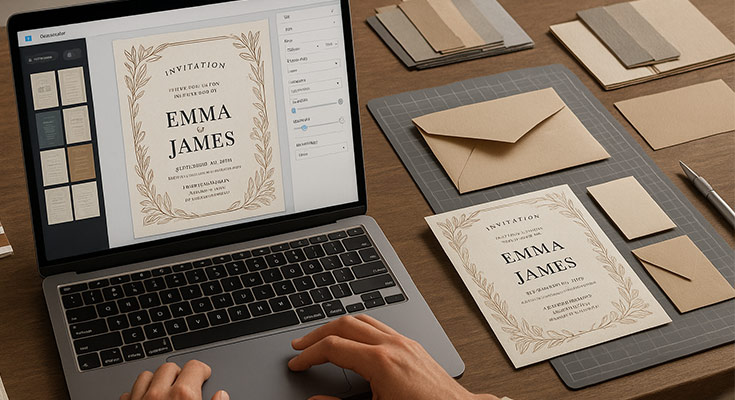
An invitation card maker is an online tool that allows you to create professional-looking physical invitation cards without prior design experience. Simply choose a template, customize colors and text, add your event details, and download print-ready files for professional cardstock printing in minutes.
Creating beautiful physical invitation cards for your special events no longer requires expensive designers or complex software. Modern invitation card makers have revolutionized how we approach event planning, making professional-quality printed designs accessible to everyone. Whether you’re planning a wedding, birthday party, baby shower, or corporate event, these user-friendly tools can help you create stunning printed invitations that guests will treasure as keepsakes.
A professional invitation card maker has made this process incredibly simple, offering hundreds of professionally designed invitation templates that you can customize for any occasion. From elegant wedding invitations to fun birthday party cards, these digital tools provide everything you need to create print-ready designs that rival expensive custom work.
What Is an Invitation Card Maker, and Why Do You Need One for Physical Cards?
An invitation card maker is a digital platform that provides pre-designed templates and easy-to-use editing tools specifically optimized for creating custom physical invitation cards. These tools have become essential for modern event planning because they bridge the gap between digital convenience and tangible, professional printed results. (Still deciding between digital and physical invitations? We’ve covered the e-invites vs printed invites comparison elsewhere if you’re weighing your options.)
The primary benefit lies in cost-effective accessibility to professional print design. Traditional graphic designers charge $100-300 per invitation design for print-ready files, while online invitation makers provide hundreds of print-optimized templates for a fraction of that cost. This democratization of print design has empowered millions of event planners to create high-quality physical invitations without breaking their budgets.
Print-specific advantages set these tools apart from general design software. Modern invitation card makers automatically handle complex print requirements like CMYK color conversion2, proper bleeds, and print-safe zones that ensure your design translates perfectly from screen to physical cardstock.
Time efficiency becomes crucial when working with print deadlines. What once required weeks of designer consultations, proofing, and revisions can now be accomplished in under two hours, leaving ample time for print production and shipping before your event date.
How Do You Choose the Right Invitation Card Maker for Physical Card Creation?
Selecting the perfect invitation card maker for physical invitations requires evaluating specific print-focused capabilities that ensure professional results on cardstock.
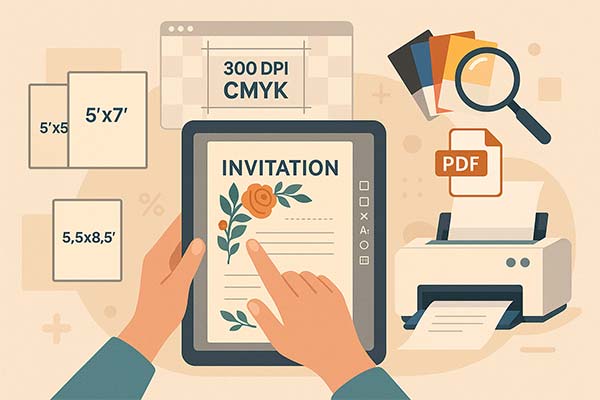
Print-ready template quality should be your primary consideration. Look for platforms offering templates specifically designed for professional printing, with proper resolution (300 DPI minimum), CMYK color profiles, and built-in bleed areas. The best invitation makers provide templates tested across multiple paper types and printing methods.
Paper size compatibility determines your printing options and costs. Essential size options include:
- Standard 5×7 inches (most popular and cost-effective)
- 4×6 inches (compact and budget-friendly)
- 5.5×8.5 inches (elegant and spacious)
- Square formats (5×5, 6×6) for modern aesthetics
- Custom sizes for unique presentations
Print specifications support ensures your chosen platform can deliver professional files. Critical features include:
- 300 DPI resolution output
- CMYK color mode conversion
- Proper bleed areas (0.125-inch standard)
- Print-safe zones for text placement
- Multiple file format exports (PDF, high-res JPEG)
Paper type optimization helps you visualize how designs will appear on different cardstock options. Advanced platforms provide previews showing how colors and textures interact with various paper finishes, helping you make informed decisions about final printing choices.
What Paper Types and Printing Options Work Best for Physical Invitation Cards?
Understanding paper options and their characteristics ensures your digital designs translate beautifully to physical cards that impress guests and reflect your event’s quality.
- Cardstock weights significantly impact your invitation’s feel and perceived value. Professional recommendations include:
- 80-90 lb cardstock provides affordable durability suitable for casual events like birthday parties or informal gatherings. This weight offers good printability while maintaining budget-friendliness for larger guest lists.
- 100-110 lb cardstock represents the sweet spot for most formal events. This weight feels substantial in recipients’ hands while remaining cost-effective for wedding invitations, baby showers, and anniversary celebrations.
- 120-130 lb cardstock delivers a premium feel appropriate for luxury events or when creating lasting keepsakes. The substantial weight conveys quality and importance, perfect for milestone celebrations or high-end corporate events.
- Paper finishes dramatically affect both appearance and printing considerations:
- Matte finishes provide elegant, non-reflective surfaces that enhance readability and offer superior print quality for text-heavy designs. Matte papers work exceptionally well with minimalist designs and dark color schemes.
- Glossy finishes create vibrant color reproduction ideal for photo-heavy invitations or designs with bright, saturated colors. However, glossy papers can show fingerprints and may create glare under certain lighting conditions.
- Linen and textured finishes add tactile interest and sophisticated appearance. These papers work beautifully for traditional or rustic-themed events, but may require special printing considerations for optimal results.
- Pearl and metallic papers create stunning effects for luxury events but require specific design considerations. Darker colors may not reproduce accurately on metallic surfaces, and special printing techniques may be necessary.
Specialty paper considerations include:
- Recycled papers for eco-conscious events
- Handmade papers for artisanal aesthetics
- Vellum overlays for layered designs
- Foil-stamped options for premium finishing
How Do You Design Physical Invitation Cards That Print Beautifully?
Creating designs that translate perfectly from screen to physical cardstock requires understanding print-specific design principles that ensure professional results. While we’ll cover the print-specific aspects here, you might also want to brush up on general invitation card design tips that apply across all formats.
Color management becomes critical when designing for physical printing. Digital screens display colors using RGB (Red, Green, Blue) color modes, while printers use CMYK (Cyan, Magenta, Yellow, Black). The best invitation card maker automatically converts colors, but understanding this difference helps you make informed design choices.
Print-safe design zones prevent important elements from being cut during trimming. Professional printers require specific margins:
- Text and crucial elements: minimum 0.25 inches from edges
- Decorative elements: minimum 0.125 inches from trim line
- Background colors or images: extend 0.125 inches beyond final size (bleed area)
Typography for print readability requires special attention to font choices and sizing:
- Minimum 8-point font size for body text
- 12-point minimum for important details like dates and addresses
- Sans-serif fonts for small text elements
- Serif fonts are acceptable for larger headline text
- Avoid extremely thin font weights that may not print clearly
Image resolution requirements ensure a crisp, professional appearance:
- 300 DPI minimum for all images
- Vector graphics are used when possible for scalability
- High-contrast images work best on textured papers
- Consider how images will appear on the chosen paper finish
Design elements optimization for physical cards includes:
- Bold, clear borders that frame content effectively
- Adequate white space to prevent a cluttered appearance
- Strategic use of contrast for important information
- Consideration of paper texture in design choices
What Are the Essential Printing Specifications for Professional Results?
Understanding technical printing requirements ensures your invitation card maker produces files that professional printers can execute flawlessly.
File format requirements vary by printing method and vendor:
PDF files represent the gold standard for professional printing, maintaining vector graphics, fonts, and color profiles consistently across different systems. Always request PDF files from your invitation card maker for professional printing.
High-resolution JPEG files work for digital printing services, but may lose some quality during compression. Ensure files are saved at maximum quality settings (minimal compression) for best results.
Resolution specifications must meet professional standards:
- 300 DPI minimum for all design elements
- 600 DPI preferred for text-only designs
- Vector graphics, when possible, for unlimited scalability
- Avoid upscaling lower-resolution images
Color profile management ensures accurate color reproduction:
- CMYK color mode for offset printing
- RGB acceptable for digital printing (many services auto-convert)
- Pantone color matching for specific brand colors
- Color calibration between the screen and the printer
Bleed and trim specifications prevent white edges or cut-off design elements:
- 0.125-inch bleed on all sides (industry standard)
- 0.25-inch safety margin for important content
- Crop marks for precise cutting (professional services)
- Consistent bleed area fill to avoid white lines
Quantity considerations affect printing methods and costs:
- Digital printing: cost-effective for quantities under 500
- Offset printing: economical for quantities over 500
- Print-on-demand: convenient for small quantities or reprints
- Bulk printing: significant cost savings for large guest lists
How Do You Choose Between Professional Printing Services and Home Printing?
Deciding between professional printing services and home printing involves weighing quality, cost, and convenience factors that impact your final results.
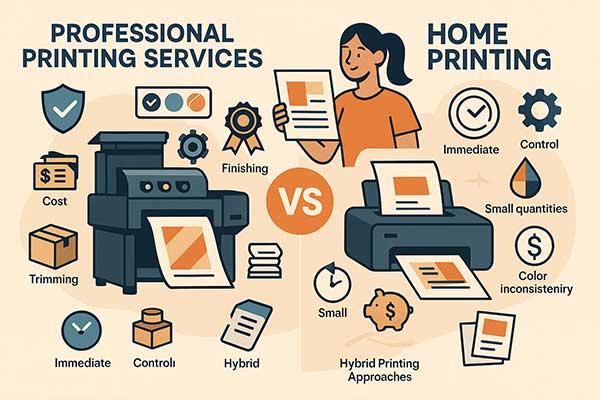
Professional Printing Services Advantages
Professional printing services offer superior quality and finishing options:
Quality and Finish Benefits
Quality advantages include:
- Professional-grade paper options are unavailable for home printers
- Precise color matching and calibration
- Finishing options like embossing, foil stamping, or die-cutting
- Consistent results across large quantities
- Professional trimming and packaging
Cost Considerations for Professional Services
Cost considerations for professional printing:
- Setup fees may apply for small quantities
- Bulk pricing reduces per-unit costs significantly
- Premium paper and finishing options increase costs
- Shipping time and costs must be factored into planning
Home Printing Options and Limitations
Home printing provides convenience and control, but with limitations:
Advantages of Home Printing
Advantages of home printing:
- Immediate results without shipping delays
- Complete control over timing and quantities
- Ability to print test copies and make adjustments
- Cost-effective for very small quantities
- No minimum order requirements
Home Printing Constraints
Limitations to consider:
- Limited paper weight capacity (most home printers handle up to 110 lb cardstock)
- Potential quality inconsistencies between prints
- Limited finishing options
- Higher per-unit costs for larger quantities
- Color accuracy challenges
Hybrid Printing Approaches
Hybrid approaches offer balanced solutions:
- Print test copies at home, final quantities professionally
- Use professional services for main invitations, and home printing for inserts
- Professional printing for formal events, home printing for casual gatherings
Go fully digital for some events (see our guide to creating digital invitations for when that makes sense)
What Design Mistakes Should You Avoid When Creating Physical Invitation Cards?
Understanding common pitfalls helps you avoid costly reprinting and ensures your physical invitations meet professional standards.
Color-related mistakes frequently plague inexperienced designers:
Insufficient contrast becomes especially problematic on physical cards. Colors that look distinct on bright computer screens may appear too similar when printed on cardstock. Always test color combinations using print previews or small test prints.
Ignoring paper color influence can dramatically alter your design’s appearance. White designs on ivory or cream cardstock will appear different than expected. Account for paper color when selecting design colors and text contrast.
Typography errors immediately signal amateur design work:
- Text too close to trim edges (less than 0.25 inches)
- Font sizes are too small for comfortable reading (under 8 points)
- Decorative fonts for important information like addresses
- Insufficient contrast between text and background colors
- Mixing too many font families (more than two, maximum)
Technical specification oversights lead to disappointing print results:
- Insufficient resolution causing pixelated images
- Missing bleed areas resulting in white edges
- RGB color mode causing unexpected color shifts
- Incorrect file dimensions for chosen paper size
- Forgetting to convert text to outlines or embed fonts
Information hierarchy problems confuse recipients:
- Equal emphasis on all text elements
- Poor visual flow that doesn’t guide the reader’s attention
- Critical information (date, location) is buried in decorative elements
- Inconsistent spacing and alignment throughout the design
Paper and printing compatibility issues:
- Designs not optimized for the chosen paper texture
- Color choices are inappropriate for the paper finish
- Design elements are too fine for textured papers
- Assuming all printers handle identical specifications
How Do You Use Digital Tools to Create Professional Physical Invitation Cards?
1Invites.com specializes in creating print-ready invitation cards that translate beautifully to physical cardstock, offering professional-quality results without requiring design expertise.
Print-optimized templates form the foundation of 1Invites.com’s approach. Every template includes:
- Built-in 300 DPI resolution for crisp printing
- Proper bleed areas and safety margins
- CMYK color profiles for accurate printing
- Multiple size options for various paper formats
- Paper type previews showing design appearance on different cardstocks
Advanced customization tools provide professional-level control while maintaining user-friendly interfaces:
- Precise color matching with CMYK and Pantone options
- Professional typography controls with print-safe font selections
- High-resolution image upload with automatic optimization
- Layout adjustments that maintain print specifications
- Real-time preview showing design on different paper types
Print preparation features ensure professional results:
- Automatic file optimization for different printing methods
- Print-ready PDF generation with proper specifications
- Color profile management for accurate reproduction
- Bleed and trim mark inclusion for professional printing
- Multiple file format exports for various printer requirements
Quality assurance tools prevent common printing mistakes:
- Print-safe zone warnings for text placement
- Color contrast checking for readability
- Resolution verification for all design elements
- Paper compatibility recommendations
- Professional printing service integration
Collaboration capabilities help multiple stakeholders contribute to design decisions:
- Shared viewing links for approval processes
- Comment and feedback systems for team input
- Version control for design iterations
- Approval workflows for final sign-off
What Are the Current Trends in Physical Invitation Card Design for 2025?
Staying current with design trends ensures your physical invitations feel contemporary while maintaining lasting appeal as keepsakes. Understanding top wedding invitation trends and broader design movements helps inform your creative decisions.

Sustainable materials and eco-conscious design reflect growing environmental awareness:
- Recycled and tree-free paper options
- Plantable seed papers for growth after events
- Minimalist designs require less ink coverage
- Digital RSVP integration reduces paper waste
- Local sourcing to reduce transportation impact
Textural elements and tactile experiences enhance physical invitation appeal:
- Letterpress printing for dimensional text
- Embossed details add a touch of interest
- Foil stamping for metallic accents
- Debossed patterns create a subtle texture
- Mixed-media approaches combining printing techniques
Bold typography as a focal design element:
- Oversized text creates a dramatic impact
- Hand-lettered elements for pea personal touch
- Typography-only designs without additional graphics
- Creative font pairing for visual interest
- Custom lettering reflecting event personality
Monochromatic and limited color palettes:
- Single-color designs with varying tones
- Black and white sophistication
- Metallic accent colors on neutral backgrounds
- Gradient effects within single color families
- Paper color integration into design schemes
Cultural fusion and personalized storytelling:
- Traditional patterns with modern layouts
- Family heritage elements incorporated tastefully
- Destination-inspired designs for travel themes
- Personal illustration and custom artwork
- Story-telling through visual design elements
For specific cultural celebrations, explore Hindu wedding invitation templates, baptism invitation designs, or first holy communion invitations that honor religious traditions.
Essential Printing Tips for Perfect Physical Invitation Cards
Successfully transitioning from digital design to beautiful physical cards requires attention to specific technical details and quality control measures.
Pre-printing checklist ensures professional results:
- Verify all text spelling and information accuracy
- Confirm proper file resolution (300 DPI minimum)
- Check that the color profiles match the printing method
- Ensure adequate bleed and safety margins
- Test print a single copy before bulk ordering
Print quality optimization involves several considerations:
- Choose an appropriate paper weight for the design complexity
- Match printing method to quantity and budget
- Consider finishing options during the design phase
- Plan for color variations between screen and print
- Allow adequate production and shipping time
Cost management strategies help maximize value:
- Compare digital vs offset printing for your quantity
- Consider standard sizes to reduce cutting costs
- Bundle printing with envelope services for savings
- Order slight overages to account for damage or late additions
- Explore local printers for reduced shipping costs
Quality control measures prevent disappointment:
- Request digital proofs before printing
- Order physical samples for color verification
- Inspect first printed copies carefully
- Maintain consistent storage conditions for printed cards
- Handle printed invitations carefully to prevent damage
People Also Ask About Physical Invitation Card Makers
Professional printing costs vary by quantity, paper type, and finishing options. Expect $1-3 per invitation for basic cardstock printing, $2-5 for premium papers, and $3-8 for specialty finishes like foil stamping or letterpress. Digital printing services often offer competitive pricing for quantities under 200, while offset printing becomes economical for larger orders.
Always request PDF files for professional printing. PDFs maintain vector graphics, embed fonts, and preserve color profiles consistently across different printing systems. High-resolution JPEG files work as alternatives but may lose some quality. Avoid PNG files for printing as they’re optimized for digital display rather than physical reproduction.
Order printed invitations 6-8 weeks before your event to allow for design finalization, printing, and shipping. Add extra time for complex finishes like letterpress (8-10 weeks) or during busy seasons (holidays, wedding season). Always request rush services if needed, though they typically incur additional costs.
Digital printing works well for quantities under 500, offers quick turnaround, and handles variable data (personalized names). Offset printing provides superior color accuracy, works better for large quantities (500+), and offers more paper and finishing options. Digital printing suits most personal events, while offset printing serves large celebrations or commercial applications.
Use invitation makers that provide CMYK color profiles and print previews. Colors appear differently on various paper types and finishes. Request printed samples before large orders, understand that screen colors (RGB) differ from print colors (CMYK), and consider paper color influence on final appearance. Professional printing services offer color matching for critical brand colors.
Conclusion
Creating professional physical invitation cards no longer requires extensive design training or expensive custom printing services. Modern invitation card makers have revolutionized the process, making beautiful, print-ready designs accessible to everyone planning special events.
Remember that the best physical invitation cards balance visual appeal with technical precision. Focus on print-safe design practices, choose appropriate paper weights and finishes for your event, and don’t hesitate to request samples before committing to large print runs. With proper planning and attention to printing requirements, creating professional physical invitation cards has truly been made easy.
Start your invitation creation journey today by exploring print-optimized templates and discovering how simple it can be to design professional-quality physical cards that impress your guests and serve as lasting keepsakes of your special event.
Reference
- Color Modes – University of Michigan Library(2024).