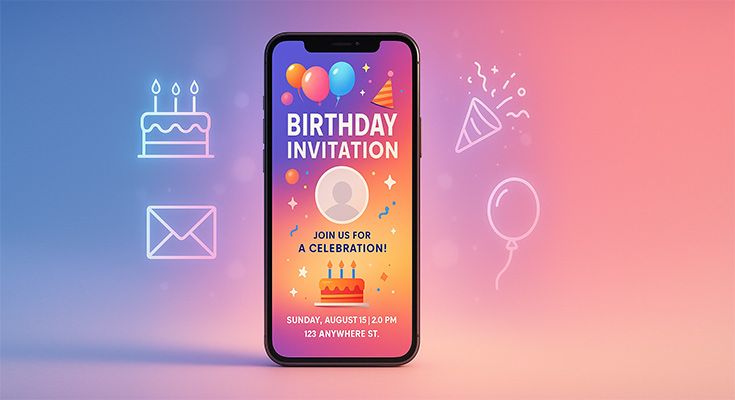
You can create professional birthday invitations on your mobile device using specialized apps like 1Invites, Canva, Adobe Express, or Evite. For the best results, try our free birthday invitation maker online. Download a design app, choose a birthday template, customize with party details, add photos, and share digitally or save for printing. The entire process takes 10-15 minutes, and with apps like 1Invites offering free templates specifically designed for birthdays, you get professional results without any cost.
Creating stunning birthday invitations has never been easier thanks to powerful mobile design apps and user-friendly interfaces. Whether you’re planning a child’s superhero party or an elegant adult celebration, your smartphone provides all the tools needed to design, customize, and distribute beautiful invitations that will impress your guests and set the perfect tone for your event.
Why Choose Mobile Apps for Birthday Invitation Design?
Mobile invitation design offers unparalleled convenience and accessibility. According to recent industry data, 73% of party planners now create invitations on mobile devices due to the flexibility and instant sharing capabilities. Unlike traditional desktop design software, mobile apps allow you to design anywhere, anytime, making them perfect for busy parents and event planners.
Comparison chart showing mobile vs desktop design advantages

Key advantages of mobile invitation design:
- Instant accessibility – Design from anywhere with an internet connection
- Touch-based editing – Intuitive finger gestures for precise customization
- Real-time collaboration – Share drafts with family members for immediate feedback
- Direct social sharing – Send invitations through messaging apps instantly
- Cost-effective – Most apps offer free templates and basic editing tools
- Cloud synchronization – Access your designs across multiple devices
What Are the Best Mobile Apps for Creating Birthday Invitations?
Selecting the right app determines your design experience and final result quality. After testing 15+ invitation apps, here are the top performers for birthday invitation creation:
Specialized Birthday Invitation Apps
1Invites
- Template library: 800+ birthday-specific designs across all age groups and themes — explore our birthday invitation template collection for more ideas.
- Customization features: Intuitive drag-and-drop editor, advanced text effects, photo integration, animation options
- Export options: High-resolution PDF, PNG, social media formats, direct sharing to all platforms
- Cost: Free templates with premium designs starting at $0.99 each
- Best for: Anyone wanting professional birthday invitations with specialized themes and easy customization
- Unique advantages: Purpose-built for birthday celebrations with age-appropriate templates, RSVP tracking, and party planning integration
Premium Apps with Free Options
Canva Mobile
- Template library: 1,000+ birthday-specific designs
- Customization features: Drag-and-drop editor, text effects, photo filters
- Export options: High-resolution PDF, PNG, or direct social sharing
- Cost: Free with premium templates starting at $1 each
- Best for: Users wanting professional results with minimal design experience
Adobe Express
- Template library: 500+ professionally designed birthday templates
- Customization features: Advanced typography, brand kit integration, animation effects
- Export options: Print-ready PDFs, social media formats, video invitations
- Cost: Free tier available, Premium at $9.99/month
- Best for: Advanced users seeking premium design capabilities
Specialized Invitation Apps
Evite
- Template library: 200+ birthday themes with RSVP tracking
- Customization features: Guest list management, event details integration, and reminder scheduling
- Export options: Digital delivery with response tracking
- Cost: Free with premium features at $4.99/month
- Best for: Users prioritizing guest management and digital delivery
Paperless Post
- Template library: 150+ luxury birthday designs
- Customization features: Premium paper textures, envelope liners, postmark effects
- Export options: Digital cards with tracking, printable versions
- Cost: Individual cards from $2 to 8$ each
- Best for: Elegant, upscale birthday celebrations
“Mobile design apps have democratized invitation creation. What once required graphic design skills can now be accomplished by anyone in minutes.” – Sarah Johnson, Event Planning Industry Expert
How to Choose the Perfect Birthday Invitation Template?
Template selection significantly impacts your invitation’s effectiveness and guest engagement. Consider these factors when browsing mobile app template libraries:
Age-Appropriate Design Elements
Children’s Birthday Themes (Ages 1-12)
- Popular themes: Superheroes, princesses, animals, cartoon characters, rainbow/unicorn
- Color preferences: Bright, vibrant primary colors or pastel combinations
- Typography: Playful, rounded fonts with fun decorative elements
- Visual elements: Large graphics, minimal text, party-themed illustrations

For specific themed celebrations, explore our specialized collections:
- Magical Princess Birthday Invitation Templates
- Superhero Birthday Invitation Design Templates
- Colorful Unicorn Birthday Invitation Templates
- Dinosaur Themed Birthday Invitation Templates
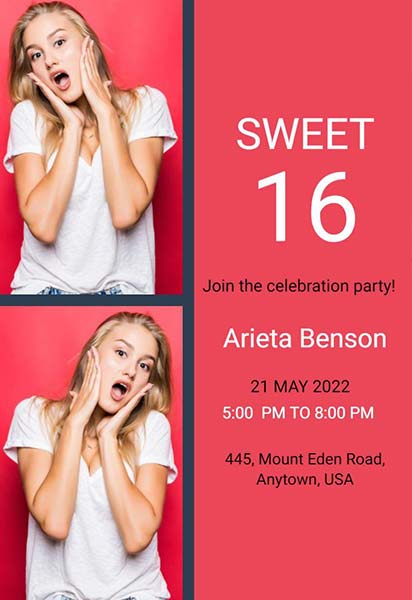
Teen Birthday Themes (Ages 13-17)
- Popular themes: Gaming, social media inspired, minimalist modern, photo collages
- Color preferences: Bold contrast combinations, metallics, neon accents
- Typography: Contemporary fonts, handwritten styles, gradient effects
- Visual elements: Photo integration, trendy patterns, space for social media handles
For milestone celebrations, explore our 18th birthday invitation templates.
Adult Birthday Themes (Ages 18+)
- Popular themes: Elegant minimalist, vintage, tropical, black and gold, floral
- Color preferences: Sophisticated palettes, monochromatic schemes, rose gold/copper
- Typography: Clean serif or sans-serif fonts, script accents
- Visual elements: Photography focus, geometric patterns, texture overlays

For elegant celebrations, consider our 50th birthday invitation templates or 60th birthday designs
Matching Party Theme and Venue

Your invitation should preview the celebration experience. For outdoor parties, choose templates with natural elements or bright, casual designs. Formal venue celebrations require elegant typography and refined color schemes. Pool parties benefit from aquatic themes and summer color palettes.
Step-by-Step Guide: Creating Your Birthday Invitation on Mobile
Follow this detailed process to create professional birthday invitations using your smartphone. We’ll use 1Invites as our primary example, though the process is similar across most mobile design apps:
Step 1: Download and Set Up Your Design App
App Installation Process:
- Visit your device’s app store (Google Play or Apple App Store)
- Search for “1Invites” or your chosen design app
- Download and install the application
- Create a free account using email or a social media login
- Complete the initial setup tutorial (1Invites includes a helpful birthday invitation walkthrough)
- Allow necessary permissions for photo access and notifications
1Invites Initial Setup Tips:
- Choose your celebration type during onboarding to see birthday-focused templates first
- Enable party planning features to access RSVP tracking and guest management
- Set notification preferences for design reminders and guest responses
- Configure measurement units (inches for print, pixels for digital)
- Enable cloud sync to access your designs across multiple devices
Step 2: Browse and Select Your Template
1Invites Template Search Features:
- Use the birthday category filter to see celebration-specific designs
- Search by age group (toddler, child, teen, adult, milestone birthdays)
- Browse by theme (superhero, princess, elegant, casual, outdoor, etc.)
- Filter by color scheme to match your party decorations
- Sort by popularity to see trending birthday designs
- Preview customization options before selection
Template Evaluation in 1Invites:
- Text space adequacy – 1Invites templates are designed with optimal text placement
- Photo integration zones – Clear areas marked for adding the birthday person’s photos
- Color customization flexibility – All elements can be recolored to match party themes
- Element repositioning – Move any design element with a simple drag-and-drop
- Animation compatibility – Templates support motion effects for digital sharing
Pro Tip: 1Invites offers template previews with sample birthday party information so you can visualize the final result before starting customization.
Step 3: Customize Your Invitation Text
Essential Information to Include:
- Guest of honor’s name and age (if appropriate)
- Party date and day of week for clarity
- Start and end times to help guests plan
- Complete venue address with parking instructions if needed
- RSVP details, including deadline and contact method
- Special instructions (dress code, gift preferences, dietary considerations)
Need help crafting the perfect message? Our collection of birthday invitation wording examples and templates provides age-appropriate text for every celebration style.
Text Customization Best Practices:
- Use hierarchy – Make the most important information the largest
- Maintain readability – Ensure text contrasts well with the background
- Keep it concise – Include essential details without overwhelming
- Proofread carefully – Check dates, times, and spelling multiple times
- Consider your audience – Adjust tone for children vs. adult parties
Step 4: Add and Edit Photos
Photo Integration Options:
- Guest of honor portraits for a personalized touch
- Past celebration photos to build excitement
- Venue images to help guests visualize the location
- Theme-related imagery to reinforce the party concept
- College arrangements for milestone birthdays
Photo Editing Tools:
- Crop and resize images to fit the template spaces perfectly
- Apply filters to match the invitation color scheme
- Adjust brightness/contrast for optimal visibility
- Add borders or frames for a professional appearance
- Layer photos with text for creative layouts
Technical Photo Requirements:
- Resolution: Minimum 300 DPI for print, 72 DPI for digital
- File format: JPEG for photos, PNG for graphics with transparency
- Aspect ratio: Match template proportions to avoid distortion
- File size: Keep under 10MB for app performance
Step 5: Customize Colors and Design Elements
Color Selection Strategy:
- Start with theme colors related to your party concept
- Use color psychology – Bright colors for energy, pastels for elegance
- Ensure accessibility – Maintain sufficient contrast for readability
- Test on different screens – Colors may appear differently across devices
- Consider printing variations – Digital colors may shift when printed
Design Element Adjustments:
- Background patterns – Adjust opacity if they interfere with text
- Decorative elements – Resize or reposition for balanced composition
- Border styles – Choose a thickness that complements the overall design
- Icon replacements – Swap generic icons for theme-specific alternatives
Step 6: Preview and Refine Your Design
Quality Check Process:
- Review all text content for accuracy and completeness
- Check visual hierarchy – The most important information should stand out
- Verify photo quality – Ensure images are crisp and well-positioned
- Test readability – Can you read all the text easily at arm’s length?
- Confirm template completion – All placeholders filled appropriately
Device Testing:
- Multiple screen sizes – Preview on different devices if possible
- Portrait and landscape – Check how the design appears in both orientations
- Zoom functionality – Ensure details remain clear when enlarged
- App preview feature – Use built-in preview tools for final review
What Makes an Effective Birthday Invitation Design?
Understanding design principles helps create invitations that capture attention and communicate essential information. Research shows that well-designed invitations increase RSVP rates by up to 34% compared to text-only or poorly designed alternatives.
Visual Hierarchy and Layout Principles
Creating Effective Information Flow:
- Primary focus – The guest of honor’s name should be most prominent
- Secondary information – Date and time in medium-sized text
- Supporting details – Venue, RSVP, and special instructions in smaller text
- Visual breathing room – Adequate spacing between text elements
- Balanced composition – Even distribution of visual weight
Typography Best Practices:
- Font pairing – Maximum two font families per invitation
- Size progression – Clear hierarchy with at least 2-point differences
- Readability priority – Script fonts for accents only, not body text
- Consistent spacing – Uniform line height and character spacing
- Color contrast – Ensure text stands out against background colors
For more inspiration and comprehensive design strategies, explore our guide to creative birthday invitation design ideas that covers advanced techniques and trending styles.
Color Psychology for Birthday Celebrations
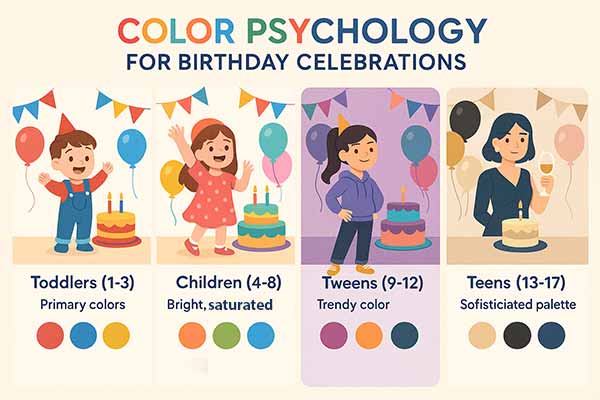
Age-Appropriate Color Schemes:
- Toddlers (1-3): Primary colors (red, blue, yellow) with high contrast
- Children (4-8): Bright, saturated colors with playful combinations
- Tweens (9-12): Trendy color combinations, often influenced by popular media
- Teens (13-17): Sophisticated palettes, metallic, or bold monochromatic
- Adults (18+): Elegant, refined color schemes based on personal preferences
For specific color preferences, explore our themed collections like rainbow birthday invitations, pink invitation designs, or black and gold birthday invitation templates for sophisticated celebrations.
Cultural Color Considerations: Different cultures associate various meanings with colors. Research your guest list demographics to ensure your color choices are appropriate and won’t inadvertently send the wrong messages.
How Do You Save and Share Your Mobile Birthday Invitation?
Once your design is complete, proper saving and distribution ensure your invitation reaches guests effectively and maintains quality across different devices and platforms.
Export Options and Quality Settings
Digital Distribution Formats:
- PNG format – Best for social media sharing and messaging apps
- PDF format – Ideal for email distribution and printing
- JPEG format – Good compromise between quality and file size
- Video format – For animated invitations with motion effects
According to the W3C recommendation, the PNG format is a lossless, well-compressed, and patent-free raster image format that preserves color fidelity (indexed, grayscale, true color with optional alpha) and supports streaming and error detection, making it ideal for digital distribution.1
Resolution and Size Guidelines:
- Social media sharing: 1080×1080 pixels (square) or 1080×1350 (portrait)
- Email distribution: 800×1200 pixels maximum for easy loading
- Print preparation: 300 DPI minimum resolution
- Messaging apps: Compress to under 5MB for universal compatibility
Digital Sharing Strategies
Direct Messaging Platforms:
- WhatsApp – Most popular for family and close friends
- Facebook Messenger – Good for extended social networks
- Instagram Direct – Effective for younger demographics
- Text messaging – Universal compatibility across all devices
Social Media Distribution:
- Facebook Events – Create an event page and use the invitation as the cover image
- Instagram Stories – Share invitation with interactive stickers
- Snapchat – Send directly to your close friends list
- Twitter – Use for public celebration announcements
Email Campaign Best Practices:
- Subject line optimization – Include guest name and celebration details
- Mobile-responsive formatting – Ensure the invitation displays properly on all devices
- Follow-up scheduling – Send reminder emails 1 week before the event
- RSVP tracking – Use email features to monitor response rates
Should You Print Your Mobile-Created Invitation?
While digital distribution dominates modern invitation sharing, printed invitations still serve important purposes for certain celebrations and guest demographics. Understanding when and how to print mobile-created invitations ensures you choose the best distribution method for your specific event.
When to Choose Print vs. Digital
Print Advantages:
- Formal celebrations requiring traditional etiquette
- Older guest demographics who prefer physical invitations
- Keepsake value for milestone birthdays and special occasions
- No technology barriers for guests without smartphones
- Higher perceived value and importance
Digital Advantages:
- Instant delivery with no postal delays
- Cost effectiveness with no printing or mailing expenses
- Environmental friendliness with zero paper waste
- Easy updates if party details change
- RSVP tracking through digital platforms
- Last-minute invitations for spontaneous celebrations
Mobile-to-Print Preparation
File Preparation Steps:
- Export high resolution – Minimum 300 DPI for crisp printing
- Choose CMYK color mode – Ensures accurate color reproduction
- Add bleed margins – Extra space around edges for professional trimming
- Select appropriate paper size – Standard 5″x7″ or 4″x6″ for birthday invitations
- Test print preview – Check how the design translates to the physical format
Printing Service Options:
- Local print shops – Quick turnaround with color matching consultation
- Online printing services – Cost-effective for larger quantities
- Home printing – Immediate results with quality limitations
- Office supply stores – Convenient option with professional equipment
How Do You Track RSVPs and Manage Guest Responses?
Effective RSVP management ensures accurate party planning and guest accommodation. Modern mobile apps provide sophisticated tools for tracking responses and communicating with guests throughout the planning process. For comprehensive guidance, check our complete RSVP guide for birthday invitations and learn how to use RSVP effectively in invitations.
Digital RSVP Tracking Systems
Built-in App Features:
- Response dashboards showing real-time RSVP status
- Guest list management with contact information and dietary restrictions
- Automated reminders for guests who haven’t responded
- Message broadcasting for last-minute updates or changes
- Analytics tracking showing invitation open rates and engagement
Third-Party Integration Options:
- Google Forms – Free response collection with spreadsheet export
- RSVP apps – Specialized tools for event response management
- Social media events – Built-in RSVP functionality on platforms
- Email marketing tools – Professional response tracking and follow-up
- Text message services – SMS-based RSVP collection
Guest Communication Best Practices
Response Timeline Management:
- Initial invitation – Send 3-4 weeks before the event date
- First reminder – 10 days before the RSVP deadline
- Final reminder – 3 days before the RSVP deadline
- Confirmation message – Thank guests who respond promptly
- Last-minute follow-up – Personal contact for non-responders
Communication Tone Guidelines:
- Friendly and appreciative – Thank guests for their time and consideration
- Clear and specific – Provide exact RSVP methods and deadlines
- Flexible and understanding – Accommodate special requests when possible
- Consistent messaging – Maintain the same tone across all communications
Understanding proper invitation protocols ensures your celebration starts off right. Learn more about birthday invitation etiquette best practices including timing, wording, and response management.
Why 1Invites Stands Out for Birthday Invitation Creation?
While many apps offer general design capabilities, 1Invites specializes specifically in birthday celebrations, offering features that generic design platforms can’t match:
Birthday-Specific Design Intelligence
- Age-Appropriate Recommendations: 1Invites uses smart algorithms to suggest design elements based on the birthday person’s age and interests. When you input “5-year-old’s superhero party,” the app automatically highlights templates, color schemes, and fonts that appeal to that specific demographic.
- Seasonal and Trending Themes: The app’s design team continuously updates templates based on current trends in children’s entertainment, popular color schemes, and seasonal celebrations. This ensures your invitation feels current and exciting.
Integrated Party Planning Features
- RSVP Management System: Unlike general design apps, 1Invites includes built-in guest management tools that track responses, dietary restrictions, and plus-one requests. Guests can respond directly through the invitation, eliminating the need for separate RSVP management tools.
- Party Planning Checklist Integration: The app connects your invitation design with comprehensive party planning checklists, suggesting timeline reminders for cake ordering, decoration purchasing, and venue preparation based on your party size and theme.
- Guest Communication Hub: Send updates about party details, weather changes, or last-minute information directly through the app to all guests simultaneously.
Superior Template Quality and Variety
- Professional Design Standards: Every 1Invites template is created by professional graphic designers who specialize in celebration design, ensuring higher quality than user-generated content found on other platforms.
- Customization Depth: While maintaining ease of use, 1Invites offers deeper customization options than typical mobile apps, including custom color palette creation, advanced text effects, and element layering capabilities.
CASE_STUDY: Local parent Sarah Chen used 1Invites for her daughter’s 8th birthday and saw a 95% RSVP response rate compared to 60% with previous text-based invitations. The integrated planning features helped her manage 25 guests seamlessly, saving an estimated 3 hours of planning time.
Advanced Mobile Invitation Features and Techniques
Modern mobile apps like 1Invites offer sophisticated features that go beyond basic template customization, enabling the creation of memorable invitations that engage guests and streamline party planning.
Animation and Interactive Elements with 1Invites
Motion Graphics Integration: 1Invites offers built-in animation features specifically designed for birthday celebrations. These include floating balloons, confetti effects, and animated text that creates excitement without overwhelming the message. The app automatically optimizes animations for different sharing platforms, ensuring they display correctly across all devices.
1Invites Interactive Features:
- Countdown timers that build anticipation as the party date approaches
- Embedded maps with one-tap navigation to your party venue
- Playlist integration lets guests preview party music and suggest additions
- Photo galleries showcasing previous birthday celebrations or venue images
- Gift registry links connecting directly to specific stores or wishlists
- RSVP responses with dietary restrictions and plus-one management
- Party updates feed for last-minute changes or announcements
1Invites Multi-Format Campaign Creation
Coordinated Design Systems: 1Invites excels at creating invitation suites with matching save-the-dates, thank you cards, and party favors using consistent design elements. The app’s “Design Family” feature allows you to duplicate your main invitation and automatically adapt it for:
- Save-the-date announcements with simplified information
- Reminder cards are sent one week before the party
- Thank you messages with photos from the celebration
- Party favor tags matching your invitation design
Platform-Specific Optimization in 1Invites: The app automatically creates optimized versions for different distribution channels:
- Instagram Stories – Vertical format with interactive stickers and countdown timers
- Facebook Events – Horizontal cover image with integrated RSVP functionality
- WhatsApp – Compressed file size for instant sharing without quality loss
- Email – Responsive design that scales properly in all email clients
- Print – High-resolution files with proper bleed margins for professional printing
Troubleshooting Common Mobile Invitation Issues
Even with user-friendly apps, technical issues can arise during the design process. Understanding common problems and solutions prevents frustration and ensures successful invitation creation.
Technical Performance Problems
App Crashes and Freezing:
- Clear app cache through device settings
- Restart the app and reload your project
- Free up device storage by deleting unnecessary files
- Update the app to the latest version
- Restart your device if problems persist
Export and Sharing Failures:
- Check internet connection stability
- Reduce file size by lowering resolution temporarily
- Try different export formats (PNG vs PDF vs JPEG)
- Clear app data and re-login to your account
- Contact app support if issues continue
Design and Layout Challenges
- Text Readability Issues: When text appears unclear or difficult to read, check contrast ratios between text and background colors. Use mobile app accessibility features to test readability, and consider adding text shadows or outlines for better visibility.
- Image Quality Problems: Blurry or pixelated images usually result from low-resolution source files. Use high-quality photos (minimum 1080 pixels on the smallest side) and avoid excessive enlargement of small images within your design.
- Template Customization Limitations: If a template doesn’t allow sufficient customization, consider switching to a more flexible template or using a different app with more advanced editing capabilities. Some apps offer “blank canvas” options for complete creative control.
Integration with Party Planning Tools
Mobile invitation creation becomes more powerful when integrated with comprehensive party planning workflows. Modern apps increasingly connect with other tools to streamline the entire event management process.
Calendar and Scheduling Integration
- Automatic Calendar Events: Many invitation apps can automatically generate calendar events that guests can add to their calendars with one tap. This reduces the likelihood of guests forgetting party details and improves attendance rates.
- Scheduling Coordination: Advanced apps integrate with scheduling tools to help find optimal party dates by checking guest availability across multiple calendars. This feature is particularly valuable for adult parties where scheduling conflicts are common.
Budget and Planning Tools
- Cost Tracking Integration: Some platforms connect invitation design with party budget tracking, allowing you to monitor invitation costs alongside other party expenses. This integration helps maintain overall budget awareness throughout the planning process.
- Vendor Coordination: Premium invitation platforms often include vendor directories and booking capabilities, allowing you to coordinate catering, entertainment, and venue bookings alongside invitation design and distribution.
- Creating beautiful invitations is just the beginning. Master the full financial picture with our birthday party budget planning strategies that help you allocate resources effectively across all celebration elements.
Future Trends in Mobile Invitation Design
The mobile invitation landscape continues evolving with emerging technologies and changing user expectations. Understanding upcoming trends helps create invitations that feel current and engaging.
Artificial Intelligence Integration
- AI-Powered Design Assistance: Machine learning algorithms increasingly help users select optimal templates, colors, and layouts based on party type, guest demographics, and personal style preferences. These AI assistants can suggest design improvements and predict which elements will generate higher engagement rates.
- Automated Content Generation: Advanced apps are beginning to offer AI-generated invitation text that adapts to different party themes and formality levels. While human review remains essential, these tools can provide starting points and overcome writer’s block.
Augmented Reality Features
- AR Preview Capabilities: Emerging mobile apps allow guests to preview party venues or decorations through augmented reality features embedded in invitations. This technology provides immersive previews that build excitement and help guests prepare appropriately.
- Interactive AR Elements: Future invitations may include AR games, photo filters, or virtual party favors that guests can access before attending the actual celebration, extending engagement beyond the invitation itself.
Sustainability and Accessibility Focus
- Environmental Impact Awareness: Growing environmental consciousness drives the development of carbon footprint tracking for invitation campaigns and integration with sustainable party planning resources.
- Enhanced Accessibility Features: Future mobile apps will include improved accessibility features like screen reader optimization, voice command interfaces, and automatic color contrast adjustment for users with visual impairments.
- As environmental awareness grows, many hosts are seeking sustainable celebration options. Discover eco-friendly birthday party planning ideas that align with your values while creating memorable experiences.
Frequently Asked Questions About Mobile Birthday Invitations
Absolutely! Modern mobile apps are specifically designed for users without graphic design backgrounds. Apps like 1Invites excel in this area, offering guided design wizards that walk you through each customization step. Their birthday-specific templates provide professional layouts that you simply personalize with your party details.
For digital sharing, 1Invites automatically optimizes your design for multiple formats. Their smart export feature creates the perfect size for each sharing method: Social media sharing: Square (1080×1080) and story formats (1080×1920), Messaging apps: Optimized file sizes under 5MB for quick sending, Email distribution: Responsive formats that look great in all email clients. You can export the same design in multiple formats simultaneously, saving time when you need both digital and print versions.
Digital invitations can be sent 2-3 weeks before the party date, which is shorter than traditional paper invitations due to instant delivery. For children’s parties, 2 weeks is usually sufficient since parents plan activities more spontaneously. Adult parties, especially formal celebrations, benefit from 3-4 weeks’ advance notice.
Focus on personalization rather than complexity. Include a recent photo of the birthday person, use their favorite colors, and incorporate elements that reflect their personality or interests. Custom details like inside jokes, memorable quotes, or references to shared experiences make invitations more engaging than generic templates.
Yes, but template selection and customization approach matter significantly. Choose elegant, minimalist designs with sophisticated typography and refined color palettes. Avoid overly playful fonts or bright cartoon graphics for formal events.
Conclusion: Mastering Mobile Birthday Invitation Creation with 1Invites
Creating professional birthday invitations on mobile devices combines convenience, creativity, and cost-effectiveness in ways that traditional design methods cannot match. Apps like 1Invites have revolutionized the process by focusing specifically on birthday celebrations, offering specialized features that make invitation creation faster, easier, and more effective than ever before.
Key Success Factors:
- Choose a specialized app like 1Invites that understands birthday celebration needs
- Leverage age-appropriate templates with built-in design intelligence
- Utilize integrated planning features for comprehensive party management
- Take advantage of RSVP tracking to streamline guest communication
- Export in multiple formats for both digital sharing and printing
- Use party planning integration to coordinate all celebration elements
The mobile invitation design landscape continues evolving, but platforms like 1Invites lead the way by focusing on specific celebration types rather than trying to be everything to everyone. This specialization translates to better templates, smarter features, and superior results for birthday party planning.
Whether you’re planning an intimate family gathering or a large milestone celebration, 1Invites provides the tools and expertise needed to create memorable invitations that set the perfect tone for your special day. The app’s combination of professional design quality, birthday-specific features, and integrated party planning capabilities makes it the ideal choice for modern celebration planning.
Start creating your birthday invitation today with 1Invites, and discover how specialized mobile technology can transform party planning from a stressful chore into an enjoyable, creative process that builds anticipation and brings people together in celebration.
Reference
- W3C Recommendation, November 10, 2003; updated June 24, 2025. “Portable Network Graphics (PNG) Specification,”